🇬🇧 English
We build the game in small steps. After almost every step you can run it and see something new.
Do not copy the whole thing at the end. Type each step. When it breaks, read the error. That is how people really learn to code.
You need Python first. If you do not have it, do Start Python on a Mac before this page.
🇹🇭 ไทย
เราจะสร้างเกมทีละขั้นเล็ก ๆ หลังจบเกือบทุกขั้น คุณสั่งรันแล้วจะเห็นอะไรใหม่ ๆ
อย่าเพิ่งคัดลอกทั้งไฟล์ตอนท้าย ให้พิมพ์ทีละขั้น พอมันพัง ให้อ่าน error นั่นคือวิธีที่คนเรียนเขียนโค้ดกันจริง ๆ
คุณต้องมี Python ก่อน ถ้ายังไม่มี ให้ทำ บทเริ่มต้น Python บน Mac ก่อนหน้านี้
🇨🇳 中文
我们一小步一小步地做。几乎每一步做完,你都可以运行一下,看到新的东西。
不要等到最后才整个复制。一步一步地敲。出错了就读错误信息 —— 真正学会写代码就是这么学的。
你需要先装好 Python。还没装的话,先做在 Mac 上开始学 Python。
0 Get ready · เตรียมตัว · 做好准备
🇬🇧 English
We use a Python library called pygame. It draws the window, the pictures and the sounds.
Open the Terminal. Install it one time:
Then make a folder for the game, and open a new file called space_invaders.py.
🇹🇭 ไทย
เราจะใช้ไลบรารีของ Python ชื่อ pygame มันวาดหน้าต่าง รูปภาพ และเสียงให้เรา
เปิด Terminal แล้วติดตั้งหนึ่งครั้ง
จากนั้นสร้างโฟลเดอร์สำหรับเกม และเปิดไฟล์ใหม่ชื่อ space_invaders.py
🇨🇳 中文
我们要用一个叫 pygame 的 Python 库。它负责画窗口、图片和声音。
打开终端,安装一次就好:
然后建一个放游戏的文件夹,新建一个文件 space_invaders.py。
pip3 install pygame

mkdir ~/Documents/Code/space
cd ~/Documents/Code/space
vim space_invaders.py
1 The entry point · จุดเริ่มต้นของโปรแกรม · 程序的入口
🇬🇧 English
Every program needs a place to start. We call it the entry point.
We put our game inside a function called main. Then we tell Python to run it.
The last line looks strange. It means: run main() only when I start this file myself. If another file imports this one, main() does not run.
Write these five lines. This is a real program. It works.
🇹🇭 ไทย
ทุกโปรแกรมต้องมีจุดเริ่มต้น เราเรียกมันว่า entry point
เราเอาเกมไว้ในฟังก์ชันชื่อ main แล้วบอก Python ให้รันมัน
บรรทัดสุดท้ายดูแปลก มันแปลว่า ให้รัน main() เฉพาะตอนที่เราสั่งรันไฟล์นี้เอง ถ้าไฟล์อื่นมา import ไฟล์นี้ main() จะไม่ทำงาน
เขียนห้าบรรทัดนี้ นี่คือโปรแกรมจริง มันทำงานได้
🇨🇳 中文
每个程序都需要一个开始的地方。我们叫它入口点。
我们把游戏放进一个叫 main 的函数里,然后告诉 Python 去运行它。
最后一行看起来很奇怪。它的意思是:只有当我自己运行这个文件时,才执行 main()。如果别的文件导入了这个文件,main() 不会运行。
写下这五行。这是一个真正的程序,它能跑。
def main():
    print("The game starts here!")


if __name__ == "__main__":
main()python3 space_invaders.py. You see one line of text.
พิมพ์ python3 space_invaders.py คุณจะเห็นข้อความหนึ่งบรรทัด
输入 python3 space_invaders.py,你会看到一行文字。
2 Open a window · เปิดหน้าต่างเกม · 打开一个窗口
🇬🇧 English
Now we make the window. This is our canvas. We draw everything on it.
Three new ideas:
pygame.init()wakes pygame up.set_modemakes the window. It gives usscreen.- The
whileloop is the game loop. It runs about 60 times every second, forever, until you close the window.
Inside the loop we do the same three things every time: look at events, draw, show it.
🇹🇭 ไทย
ตอนนี้เราจะสร้างหน้าต่าง นี่คือ ผืนผ้าใบ ของเรา เราวาดทุกอย่างลงบนมัน
สามเรื่องใหม่
pygame.init()ปลุก pygame ให้ทำงานset_modeสร้างหน้าต่าง แล้วให้screenกลับมา- ลูป
whileคือ game loop มันทำงานประมาณ 60 ครั้งต่อวินาที ไปเรื่อย ๆ จนกว่าคุณจะปิดหน้าต่าง
ในลูปเราทำสามอย่างเดิมทุกครั้ง ดู event วาด แสดงผล
🇨🇳 中文
现在我们来做窗口。这就是我们的画布,所有东西都画在它上面。
三个新东西:
pygame.init()把 pygame 叫醒。set_mode创建窗口,并把screen交给我们。while循环就是游戏循环。它每秒大约运行 60 次,一直重复,直到你关掉窗口。
循环里每次都做同样的三件事:看事件、画、显示出来。
import pygame

WIDTH = 960
HEIGHT = 640


def main():
    pygame.init()
    screen = pygame.display.set_mode((WIDTH, HEIGHT))
    pygame.display.set_caption("Space Invaders")

    running = True
    while running:
        # 1. look at events
        for event in pygame.event.get():
            if event.type == pygame.QUIT:
                running = False

        # 2. draw
        screen.fill((10, 12, 30))

        # 3. show it
        pygame.display.flip()

    pygame.quit()


if __name__ == "__main__":
main()3 Slow it down with a clock · ใส่นาฬิกาเพื่อคุมความเร็ว · 用时钟控制速度
🇬🇧 English
Right now the loop runs as fast as your computer can go. That is too fast, and the fan gets loud.
A clock keeps it at 60 frames every second. One turn of the loop is one frame.
Add two lines.
🇹🇭 ไทย
ตอนนี้ลูปทำงานเร็วเท่าที่เครื่องจะไหว ซึ่งเร็วเกินไป และพัดลมจะดัง
นาฬิกา จะคุมให้อยู่ที่ 60 เฟรมต่อวินาที ลูปหนึ่งรอบคือหนึ่ง เฟรม
เพิ่มสองบรรทัด
🇨🇳 中文
现在这个循环会用电脑的最快速度跑。太快了,风扇会很吵。
时钟把它控制在每秒 60 帧。循环转一圈就是一帧。
加两行。
FPS = 60 clock = pygame.time.Clock() clock.tick(FPS)4 Our first class: the player · คลาสแรกของเรา: ผู้เล่น · 第一个类:玩家
🇬🇧 English
A class is a plan for making things. From one plan we can make many things.
__init__ runs one time, when we make a new player. It gives the player its first numbers.
self means this one player. self.x is this player's x. Every method takes self first.
Our player has an x, a y, a speed, and 3 lives. That is all.
🇹🇭 ไทย
คลาส คือแบบแปลนสำหรับสร้างสิ่งของ จากแบบเดียวเราสร้างของได้หลายชิ้น
__init__ ทำงานหนึ่งครั้ง ตอนที่เราสร้างผู้เล่นใหม่ มันใส่ตัวเลขชุดแรกให้ผู้เล่น
self แปลว่า ผู้เล่นคนนี้ self.x คือค่า x ของผู้เล่นคนนี้ ทุกเมธอดต้องรับ self เป็นตัวแรก
ผู้เล่นของเรามี x, y, ความเร็ว และ 3 ชีวิต แค่นั้นเอง
🇨🇳 中文
类是造东西的图纸。用一张图纸可以造出很多个东西。
__init__ 只在我们新建一个玩家时运行一次,给这个玩家最初的那些数字。
self 的意思是这一个玩家。self.x 就是这个玩家的 x。每个方法的第一个参数都是 self。
我们的玩家有 x、y、速度和 3 条命。就这些。
WHITE = (255, 255, 255)


class Player:
    def __init__(self):
        self.x = WIDTH // 2
        self.y = HEIGHT - 70
        self.speed = 6
        self.lives = 3
        self.score = 0

    def draw(self, screen):
pygame.draw.rect(screen, WHITE, (self.x - 20, self.y - 10, 40, 20)) player = Player() player.draw(screen)5 Make the player move · ทำให้ผู้เล่นเคลื่อนที่ · 让玩家动起来
🇬🇧 English
We add a method called update. It looks at the keyboard and changes self.x.
The last two lines stop the ship leaving the screen.
🇹🇭 ไทย
เราเพิ่มเมธอดชื่อ update มันดูแป้นพิมพ์แล้วเปลี่ยนค่า self.x
สองบรรทัดสุดท้ายกันไม่ให้ยานออกนอกจอ
🇨🇳 中文
我们加一个叫 update 的方法。它看键盘,然后改变 self.x。
最后两行让飞船不会跑出屏幕。
    def update(self, keys):
        if keys[pygame.K_LEFT]:
            self.x -= self.speed
        if keys[pygame.K_RIGHT]:
            self.x += self.speed

        if self.x < 20:
            self.x = 20
        if self.x > WIDTH - 20:
self.x = WIDTH - 20 keys = pygame.key.get_pressed()
player.update(keys)6 A class for bullets · คลาสสำหรับกระสุน · 子弹的类
🇬🇧 English
A bullet is very simple. It has a place, a speed and a colour.
A negative speed goes up. A positive speed goes down. We will use the same class for the player's bullets and the creeps' bullets. Only the number changes.
We keep all the bullets in a list. Each frame we move every bullet in the list, and throw away the ones that left the screen.
🇹🇭 ไทย
กระสุนง่ายมาก มันมีตำแหน่ง ความเร็ว และสี
ความเร็วเป็น ลบ คือขึ้นข้างบน เป็น บวก คือลงข้างล่าง เราจะใช้คลาสเดียวกันนี้ทั้งกระสุนผู้เล่นและกระสุนศัตรู เปลี่ยนแค่ตัวเลข
เราเก็บกระสุนทั้งหมดไว้ใน ลิสต์ ทุกเฟรมเราขยับกระสุนทุกนัดในลิสต์ แล้วทิ้งนัดที่ออกนอกจอไป
🇨🇳 中文
子弹非常简单。它有位置、速度和颜色。
速度是负数就往上飞,是正数就往下飞。玩家的子弹和敌人的子弹用同一个类,只是数字不同。
我们把所有子弹放在一个列表里。每一帧移动列表里的每颗子弹,再把飞出屏幕的扔掉。
YELLOW = (255, 220, 60)


class Bullet:
    def __init__(self, x, y, speed, colour):
        self.x = x
        self.y = y
        self.speed = speed          # up is negative, down is positive
        self.colour = colour

    def update(self):
        self.y += self.speed

    def is_gone(self):
        return self.y < -20 or self.y > HEIGHT + 20

    def rect(self):
        return pygame.Rect(self.x - 2, self.y - 8, 4, 16)

    def draw(self, screen):
pygame.draw.rect(screen, self.colour, self.rect()) my_bullets = [] for event in pygame.event.get():
if event.type == pygame.QUIT: # you already have this
running = False
elif event.type == pygame.KEYDOWN and event.key == pygame.K_SPACE:
my_bullets.append(Bullet(player.x, player.y - 24, -10, YELLOW)) for bullet in my_bullets:
bullet.update()
bullet.draw(screen)
my_bullets = [b for b in my_bullets if not b.is_gone()]7 The creep class — the important one · คลาสของศัตรู — คลาสสำคัญ · 敌人的类 —— 最重要的一个
🇬🇧 English
Now the best part. Look at __init__. It takes six numbers:
y— its line across the screen.speed— how fast it flies right.path—"straight"or"curve".hp— hit points: 1, 2 or 3.fire_rate— shoot every N frames. A small number means it shoots often.image— its picture.
Every creep starts at x = -50. That is just off the left edge, so it flies in from outside the screen.
A curved creep uses math.sin. Sine goes up and down, up and down, forever. That makes a wave.
🇹🇭 ไทย
มาถึงส่วนที่ดีที่สุด ดูที่ __init__ มันรับตัวเลข หกตัว
y— เส้นทางแนวนอนของมันspeed— บินไปทางขวาเร็วแค่ไหนpath—"straight"หรือ"curve"hp— พลังชีวิต 1, 2 หรือ 3fire_rate— ยิงทุก ๆ กี่เฟรม ตัวเลขน้อยแปลว่ายิงบ่อยimage— รูปของมัน
ศัตรูทุกตัวเริ่มที่ x = -50 ซึ่งอยู่นอกขอบ ซ้าย พอดี มันจึงบินเข้ามาจากนอกจอ
ตัวที่บินโค้งใช้ math.sin ค่า sine จะขึ้นแล้วลง ขึ้นแล้วลง ไปเรื่อย ๆ ทำให้เกิดคลื่น
🇨🇳 中文
现在是最精彩的部分。看 __init__,它接收六个数字:
y—— 它横穿屏幕的那条线。speed—— 往右飞得多快。path——"straight"(直线)或"curve"(曲线)。hp—— 血量:1、2 或 3。fire_rate—— 每隔多少帧开一枪。数字小 = 开枪频繁。image—— 它的图片。
每个敌人都从 x = -50 开始,也就是左边缘外面一点,所以它是从屏幕外飞进来的。
走曲线的敌人用了 math.sin。正弦值会上上下下、来回摆动,这就画出了一条波浪。
import math
import random

RED = (255, 80, 80)


class Creep:
    def __init__(self, image, y, speed, path, hp, fire_rate):
        self.image = image
        self.x = -50                # every creep starts off the left edge
        self.start_y = y
        self.y = y
        self.speed = speed
        self.path = path            # "straight" or "curve"
        self.hp = hp                # 1, 2 or 3
        self.fire_rate = fire_rate  # small number = shoots often
        self.timer = random.randint(0, fire_rate)
        self.wave = 0.0

    def update(self):
        self.x += self.speed

        if self.path == "curve":
            self.wave += 0.04
            self.y = self.start_y + math.sin(self.wave) * 70

        self.timer += 1

    def wants_to_shoot(self):
        if self.timer >= self.fire_rate:
            self.timer = 0
            return True
        return False

    def is_gone(self):
        return self.x > WIDTH + 60
8 Many creeps, all different · ศัตรูหลายตัว ต่างกันหมด · 很多敌人,各不相同
🇬🇧 English
This is the whole idea of a class.
We wrote Creep one time. Now we make many creeps, and we give each one different numbers. Same class. Different behaviour.
One creep is slow, tough and flies straight. The next one is fast, weak and flies in a wave. We did not write new code for them. We only changed the numbers in __init__.
A new creep arrives every 45 frames — about every three quarters of a second.
🇹🇭 ไทย
นี่คือหัวใจของการใช้คลาส
เราเขียน Creep ครั้งเดียว แล้วสร้างศัตรูหลายตัว โดยให้ ตัวเลขต่างกัน คลาสเดียวกัน แต่พฤติกรรมต่างกัน
ตัวหนึ่งช้า อึด และบินตรง อีกตัวเร็ว บอบบาง และบินเป็นคลื่น เราไม่ได้เขียนโค้ดใหม่ให้มันเลย เราแค่เปลี่ยนตัวเลขใน __init__
ศัตรูตัวใหม่จะมาทุก 45 เฟรม ประมาณสามในสี่วินาที
🇨🇳 中文
这就是「类」的全部意义。
我们只写了一次 Creep。现在造出很多个敌人,每个给不同的数字。同一个类,不同的行为。
有的敌人慢、结实、走直线;下一个又快、又脆、走波浪线。我们没有为它们写新代码,只改了 __init__ 里的数字。
每 45 帧来一个新敌人 —— 大约每四分之三秒。
def make_creep(images):
    hp = random.choice([1, 1, 2, 2, 3])

    return Creep(
        image=images[hp],
        y=random.randint(70, HEIGHT // 2),
        speed=random.uniform(1.0, 3.2),
        path=random.choice(["straight", "curve"]),
        hp=hp,
        fire_rate=random.randint(70, 200),
) creeps = []
spawn_timer = 0 spawn_timer += 1
if spawn_timer >= 45:
spawn_timer = 0
creeps.append(make_creep(creep_images))
for creep in creeps:
creep.update()
creep.draw(screen)
creeps = [c for c in creeps if not c.is_gone()]9 The creeps shoot back · ศัตรูยิงตอบ · 敌人开始还击
🇬🇧 English
Now fire_rate does its job.
Each frame we ask every creep: are you ready to shoot? A creep with fire_rate = 70 says yes often. A creep with fire_rate = 200 says yes rarely.
Their bullets have a positive speed, so they go down.
🇹🇭 ไทย
ตอนนี้ fire_rate ได้ทำงานของมันแล้ว
ทุกเฟรมเราถามศัตรูทุกตัวว่า พร้อมยิงหรือยัง ตัวที่ fire_rate = 70 จะตอบว่าพร้อมบ่อย ส่วนตัวที่ fire_rate = 200 จะนาน ๆ ครั้ง
กระสุนของศัตรูมีความเร็วเป็น บวก มันจึงพุ่งลงล่าง
🇨🇳 中文
现在轮到 fire_rate 发挥作用了。
每一帧我们问每个敌人:你准备好开枪了吗? fire_rate = 70 的敌人经常说「好了」,fire_rate = 200 的很少说。
它们的子弹速度是正数,所以往下飞。
their_bullets = [] for creep in creeps:
creep.update()
if creep.wants_to_shoot():
their_bullets.append(Bullet(creep.x, creep.y + 20, 5, RED))10 Hits and hit points · การโดนยิงและพลังชีวิต · 命中与血量
🇬🇧 English
A Rect is a box. colliderect asks: do these two boxes touch?
When your bullet touches a creep, the creep loses one hit point. A creep with hp = 3 needs three hits. A creep with hp = 1 dies at once.
We use list(...) to make a copy. You must not remove things from a list while you walk through it.
🇹🇭 ไทย
Rect คือกล่องสี่เหลี่ยม ส่วน colliderect ถามว่า กล่องสองใบนี้ชนกันไหม
เมื่อกระสุนของคุณโดนศัตรู ศัตรูจะเสียพลังชีวิตไป หนึ่ง แต้ม ตัวที่ hp = 3 ต้องยิงสามครั้ง ส่วนตัวที่ hp = 1 ตายทันที
เราใช้ list(...) เพื่อทำสำเนา ห้ามลบของออกจากลิสต์ขณะที่กำลังวนอ่านลิสต์นั้นอยู่
🇨🇳 中文
Rect 就是一个方框。colliderect 问的是:这两个框碰到了吗?
你的子弹碰到敌人时,敌人掉一点血。hp = 3 的敌人要打三下,hp = 1 的一下就没了。
我们用 list(...) 做一份副本。正在遍历一个列表的时候,不能同时从里面删东西。
        for bullet in list(my_bullets):
            for creep in list(creeps):
                if bullet.rect().colliderect(creep.rect()):
                    my_bullets.remove(bullet)
                    creep.hp -= 1                  # take one hit point away
                    if creep.hp <= 0:
                        creeps.remove(creep)
                        player.score += 10
                    break

        for bullet in list(their_bullets):
            if bullet.rect().colliderect(player.rect()):
                their_bullets.remove(bullet)
                player.lives -= 1
11 Score, lives and game over · คะแนน ชีวิต และจบเกม · 分数、生命和游戏结束
🇬🇧 English
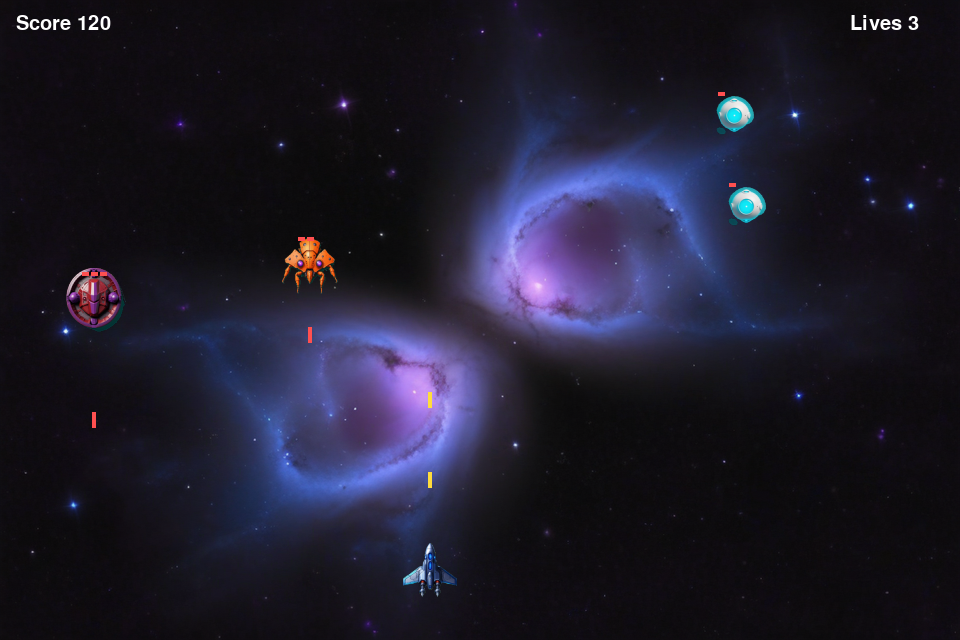
The player already has score and lives from __init__. Now we show them on the screen.
When lives reach zero, we set playing = False. The game still draws, but nothing moves. Press R and we make a new Player() — a fresh object, with 3 lives again.
🇹🇭 ไทย
ผู้เล่นมี score และ lives อยู่แล้วจาก __init__ ตอนนี้เราแค่เอามาแสดงบนจอ
เมื่อชีวิตเหลือศูนย์ เราตั้ง playing = False เกมยังวาดภาพอยู่ แต่ไม่มีอะไรขยับ กด R แล้วเราสร้าง Player() ตัวใหม่ เป็นออบเจกต์ใหม่ที่มี 3 ชีวิตอีกครั้ง
🇨🇳 中文
玩家在 __init__ 里已经有 score 和 lives 了。现在把它们显示在屏幕上。
生命归零时,我们把 playing 设为 False。画面还在画,但什么都不动了。按 R,我们就新建一个 Player() —— 一个全新的对象,又有 3 条命。
    font = pygame.font.SysFont(None, 30)
playing = True screen.blit(font.render(f"Score {player.score}", True, WHITE), (16, 14))
screen.blit(font.render(f"Lives {player.lives}", True, WHITE), (WIDTH - 110, 14)) for bullet in list(their_bullets): # you already have this
if bullet.rect().colliderect(player.rect()):
their_bullets.remove(bullet)
player.lives -= 1
if player.lives <= 0: # add these two lines
playing = False for event in pygame.event.get():
if event.type == pygame.QUIT: # you already have this
running = False
elif event.type == pygame.KEYDOWN and event.key == pygame.K_r and not playing:
player = Player() # a brand new object
creeps = []
playing = True12 Add the pictures · ใส่รูปภาพ · 加上图片
🇬🇧 English
Download the five pictures. Put them either in a folder called images next to your game file, or in the same folder as the game file. Our code looks in both places.
find_image_dir checks images first, then the folder itself. Downloads usually land next to the game, not in a subfolder.
If a picture is missing, load_image makes a coloured box instead. So the game always works. But it also tells you — a game that quietly shows boxes is confusing.
Load the pictures after set_mode. Before the window exists, pygame cannot prepare a picture.
🇹🇭 ไทย
ดาวน์โหลดรูปทั้งห้า แล้ววางไว้ หรือ ในโฟลเดอร์ชื่อ images ข้าง ๆ ไฟล์เกม หรือ ในโฟลเดอร์เดียวกับไฟล์เกมก็ได้ โค้ดของเราหาให้ทั้งสองที่
find_image_dir จะดูใน images ก่อน แล้วค่อยดูในโฟลเดอร์นั้นเอง เพราะไฟล์ที่ดาวน์โหลดมามักจะอยู่ข้าง ๆ ตัวเกม ไม่ได้อยู่ในโฟลเดอร์ย่อย
ถ้าหารูปไม่เจอ load_image จะสร้างกล่องสีแทน เกมจึงทำงานได้เสมอ แต่มันจะบอกคุณด้วย เพราะเกมที่ขึ้นกล่องสีเงียบ ๆ ทำให้สับสน
โหลดรูป หลัง set_mode เพราะถ้ายังไม่มีหน้าต่าง pygame จะเตรียมรูปไม่ได้
🇨🇳 中文
下载那五张图片。可以放进游戏文件旁边一个叫 images 的文件夹,也可以直接和游戏文件放在同一个文件夹里。我们的代码两个地方都会找。
find_image_dir 先看 images,再看文件夹本身。下载下来的文件通常就落在游戏旁边,而不是子文件夹里。
如果图片不在,load_image 就改画一个彩色方块,所以游戏永远能跑。但它也会告诉你 —— 一个默默显示方块的游戏很让人困惑。
要在 set_mode 之后加载图片。窗口还没建好时,pygame 没办法准备图片。
from pathlib import Path

PICTURES = ["background.png", "player.png", "creep1.png", "creep2.png", "creep3.png"]


def find_image_dir():
    here = Path(__file__).resolve().parent
    for folder in (here / "images", here):
        if (folder / "background.png").exists():
            return folder
    return here / "images"          # nothing found - report this one


IMAGE_DIR = find_image_dir()


def report_images():
    found = [n for n in PICTURES if (IMAGE_DIR / n).exists()]
    print(f"Looking for pictures in: {IMAGE_DIR}")
    print(f"Found {len(found)} of {len(PICTURES)}.")
    if len(found) < len(PICTURES):
        print("The game still works. It draws coloured boxes instead.")


def load_image(name, size, colour):
    path = IMAGE_DIR / name
    if path.exists():
        picture = pygame.image.load(str(path)).convert_alpha()
        return pygame.transform.smoothscale(picture, size)
    box = pygame.Surface(size, pygame.SRCALPHA)
    box.fill(colour)
return box report_images() background = load_image("background.png", (WIDTH, HEIGHT), DARK)
player_image = load_image("player.png", (54, 54), WHITE)
creep_images = {
1: load_image("creep1.png", (48, 48), (90, 220, 230)),
2: load_image("creep2.png", (56, 56), (240, 160, 60)),
3: load_image("creep3.png", (64, 64), (190, 110, 230)),
}Found 0 of 5, copy the .png files to the folder it names.
สั่งรัน สองบรรทัดแรกจะบอกว่ามันหาที่ไหนและเจอกี่รูป ถ้าขึ้นว่า Found 0 of 5 ให้คัดลอกไฟล์ .png ไปไว้ในโฟลเดอร์ที่มันบอก
运行一下。开头两行会说它去哪里找、找到了几张。如果显示 Found 0 of 5,就把 .png 复制到它指出的那个文件夹。
13 The whole game · เกมทั้งหมด · 完整的游戏
🇬🇧 English
Here is the finished file, with everything joined together and tidied up. Download it and compare it with your own.
Put space_invaders.py in a folder. Make an images folder next to it. Put the five pictures inside. Then run it.
🇹🇭 ไทย
นี่คือไฟล์ที่เสร็จแล้ว รวมทุกอย่างเข้าด้วยกันและจัดให้เรียบร้อย ดาวน์โหลดไปเทียบกับของคุณเองได้
วาง space_invaders.py ไว้ในโฟลเดอร์ สร้างโฟลเดอร์ images ข้าง ๆ แล้วเอารูปทั้งห้าใส่ไว้ จากนั้นสั่งรัน
🇨🇳 中文
这是完成后的文件,所有东西都拼在一起并整理好了。下载下来,和你自己写的对照一下。
把 space_invaders.py 放进一个文件夹,旁边建一个 images 文件夹,把五张图片放进去,然后运行。




cd ~/Documents/Code/space
mkdir images          # put the five pictures in here
python3 space_invaders.py
14 Now change it · ลองแก้ดู · 现在动手改它
🇬🇧 English
The game is yours now. Change one number. Run it. See what happens.
Most of these change only the numbers we put into __init__. That is the lesson: the class stays the same, the numbers make the difference.
🇹🇭 ไทย
เกมนี้เป็นของคุณแล้ว ลองเปลี่ยนตัวเลขสักตัว แล้วสั่งรัน ดูว่าเกิดอะไรขึ้น
ส่วนใหญ่แค่เปลี่ยนตัวเลขที่เราใส่เข้าไปใน __init__ นี่แหละคือบทเรียน คลาสยังเหมือนเดิม แต่ตัวเลขทำให้ทุกอย่างต่างออกไป
🇨🇳 中文
这个游戏现在是你的了。改一个数字,运行一下,看看会发生什么。
下面大部分只是改我们传给 __init__ 的数字。这正是这一课的重点:类没有变,是数字造成了差别。
| Try this | How | Level |
|---|---|---|
| Make the creeps faster | In make_creep, change random.uniform(1.0, 3.2) to (2.0, 6.0). | easy |
| Make a creep with 5 hit points | Change random.choice([1, 1, 2, 2, 3]) and add a picture for hp = 5. | easy |
| Make the wave bigger | In Creep.update, change * 70 to * 150. | easy |
| Give the player 5 lives | One number in Player.__init__. | easy |
| Add a third path | Add "zigzag" to path and write what it does in update. | harder |
| Make hard creeps worth more | Give player.score 10 * creep.hp instead of 10. | harder |