👾 Make a space game in JavaScript
You will start with an empty file. Nine steps later you will have a game with a ship, bullets, aliens and a score — and you can play it with the arrow keys. You need no money, no new programs and no libraries. Only a text editor and the browser you are using right now. 你会从一个空文件开始。九步之后,你会得到一个有飞船、子弹、外星人和分数的游戏, 而且可以用方向键玩。不用花钱,不用装新程序,不用任何库。只要一个文本编辑器和你现在用的这个浏览器。 คุณจะเริ่มจากไฟล์เปล่า อีกเก้าขั้นตอนคุณจะได้เกมที่มียาน กระสุน เอเลี่ยน และคะแนน และเล่นได้ด้วยปุ่มลูกศร ไม่ต้องใช้เงิน ไม่ต้องลงโปรแกรมใหม่ ไม่ต้องใช้ไลบรารี ใช้แค่โปรแกรมแก้ข้อความกับเบราว์เซอร์ที่คุณกำลังใช้อยู่นี้
New to the words variable, array, loop and event? Learn them first in the JavaScript Lab, then come back. It takes fifteen minutes and this page will make much more sense. 还不熟悉变量、数组、循环、事件这些词? 先去 JavaScript 实验室学一遍再回来。只要十五分钟,这一页会好懂得多。 ยังไม่รู้จักคำว่า ตัวแปร อาร์เรย์ ลูป อีเวนต์ ใช่ไหม ไปเรียนที่ JavaScript Lab ก่อนแล้วค่อยกลับมา ใช้เวลาสิบห้านาที แล้วหน้านี้จะเข้าใจง่ายขึ้นมาก
← JavaScript Lab Make a map → The same game in Python ▶ Play it now
🎯 What you are making
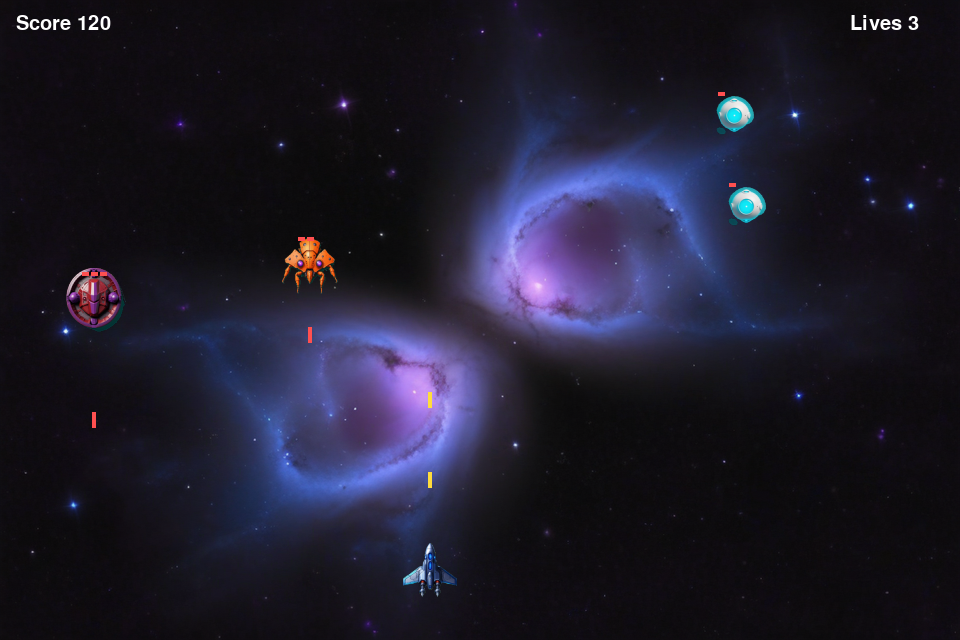
One file. One canvas. A ship you drive with the arrow keys, bullets you fire with the space bar, twenty-one aliens that walk across and step down, and a score. Every part uses one small idea, and you add them one at a time.
一个文件,一块画布。用方向键开的飞船、按空格发射的子弹、二十一个横着走并往下踏的外星人,还有分数。每一部分只用一个小概念,而且是一次加一个。
ไฟล์เดียว แคนวาสเดียว ยานที่บังคับด้วยปุ่มลูกศร กระสุนที่ยิงด้วยสเปซบาร์ เอเลี่ยนยี่สิบเอ็ดตัวที่เดินขวางแล้วก้าวลง และคะแนน แต่ละส่วนใช้แนวคิดเล็ก ๆ อย่างเดียว และเพิ่มทีละอย่าง
🧭 Nine steps
Do them in order. Press ✓ done when a step works. Your progress stays on this device. 按顺序做。一步做成功了就按 ✓ done。进度保存在这台设备上。 ทำตามลำดับ กด ✓ done เมื่อขั้นตอนนั้นสำเร็จ ความคืบหน้าจะเก็บไว้ในเครื่องนี้
1Make one empty file
Make a new folder called
space. Inside it, make a file called index.html. Use any text
editor: Notepad on Windows, TextEdit on a Mac, or the free
VS Code.
新建一个文件夹叫 space。在里面新建一个文件叫 index.html。
用任何文本编辑器:Windows 的记事本、Mac 的 TextEdit,或者免费的 VS Code。
สร้างโฟลเดอร์ใหม่ชื่อ space ข้างในสร้างไฟล์ชื่อ index.html
ใช้โปรแกรมแก้ข้อความอะไรก็ได้: Notepad บน Windows, TextEdit บน Mac หรือ VS Code ที่ใช้ฟรี
index.html.txt. In the save box, choose All files for the file type.
And on a Mac, TextEdit must be in plain text mode: Format → Make Plain Text.
Windows 上的两个坑:记事本会把文件存成 index.html.txt。
保存时把文件类型选成所有文件。Mac 上的 TextEdit 要切成纯文本:格式 → 制作纯文本。
สองกับดัก Notepad ชอบบันทึกเป็น index.html.txt
ตอนบันทึกให้เลือกชนิดไฟล์เป็น All files ส่วนบน Mac ต้องตั้ง TextEdit เป็นข้อความล้วน: Format → Make Plain Text2Write the page skeleton
Every web page has the same
bones. Type this in, save it, then double-click index.html. Your browser
opens and shows the title.
每个网页的骨架都一样。把这段打进去、保存,然后双击 index.html。
浏览器会打开并显示标题。
ทุกหน้าเว็บมีโครงเหมือนกัน พิมพ์อันนี้ บันทึก แล้วดับเบิลคลิก index.html
เบราว์เซอร์จะเปิดขึ้นและแสดงหัวเรื่อง
Now press F12 and open the Console tab. Your message is there. That console will be your best friend for the rest of this tutorial. 现在按 F12,打开 Console(控制台)标签,你的消息就在那里。 接下来的整个教程,控制台都是你最好的朋友。 ตอนนี้กด F12 แล้วเปิดแท็บ Console ข้อความของคุณอยู่ตรงนั้น คอนโซลจะเป็นเพื่อนที่ดีที่สุดของคุณตลอดบทเรียนนี้
head is information about the page.
body is what you see. script is where JavaScript lives. Put the
script at the bottom of the body, so the page exists before your code looks for it.
每部分做什么:head 是关于页面的信息,body 是你看到的东西,
script 是 JavaScript 待的地方。把 script 放在 body 的最后,
这样代码去找页面元素时,页面已经存在了。
แต่ละส่วนทำอะไร head คือข้อมูลเกี่ยวกับหน้า body คือสิ่งที่คุณเห็น
script คือที่อยู่ของ JavaScript วางสคริปต์ไว้ล่างสุดของ body
เพื่อให้หน้าเว็บมีอยู่แล้วก่อนที่โค้ดจะไปหามัน3Add the canvas and paint it black
A canvas is an empty rectangle you can draw on. Add it to the body, then ask it for a context — the object that holds all the drawing commands. 画布就是一块可以在上面画画的空矩形。把它加到 body 里,然后向它要一个 context(上下文)—— 所有绘图命令都在这个对象上。 แคนวาสคือสี่เหลี่ยมว่าง ๆ ที่คุณวาดลงไปได้ เพิ่มมันเข้าไปใน body แล้วขอ context จากมัน — อ็อบเจกต์ที่เก็บคำสั่งวาดทั้งหมด
Save, reload the page. A dark rectangle appears. That rectangle is your whole game world. 保存、刷新页面。出现一个深色矩形。那个矩形就是你整个游戏世界。 บันทึกแล้วโหลดหน้าใหม่ สี่เหลี่ยมสีเข้มจะปรากฏ นั่นคือโลกทั้งใบของเกมคุณ
) or a missing ;.
什么都没发生?打开控制台。红色那行会带着行号,准确告诉你错在哪。
十次里有九次是少了一个 ) 或 ;。
ไม่มีอะไรเกิดขึ้น? เปิดคอนโซล บรรทัดสีแดงพร้อมเลขบรรทัดจะบอกว่าผิดตรงไหน
เก้าในสิบครั้งคือลืม ) หรือ ;4Load the pictures and draw the ship
Pictures take time to arrive from the internet. So we make an object to hold them, and a small function that draws a coloured box if a picture is not ready yet. 图片从网上下载需要时间。所以我们用一个对象来装它们, 再写一个小函数:如果图片还没准备好,就先画一个彩色方块。 รูปภาพใช้เวลาโหลดจากอินเทอร์เน็ต เราจึงสร้างอ็อบเจกต์ไว้เก็บรูป และฟังก์ชันเล็ก ๆ ที่วาดกล่องสีแทนถ้ารูปยังมาไม่ถึง
5The game loop — and a ship that moves
Here is the heart of every game. Wipe the screen, move things, draw them, ask for the next frame. Sixty times a second. Two events remember which keys are held down. 这是所有游戏的心脏:擦掉屏幕、移动东西、画出来、请求下一帧。每秒六十次。 两个事件负责记住哪些键正被按住。 นี่คือหัวใจของทุกเกม: ลบจอ ขยับสิ่งของ วาดมัน แล้วขอเฟรมถัดไป หกสิบครั้งต่อวินาที อีเวนต์สองตัวคอยจำว่าปุ่มไหนถูกกดค้างอยู่
Save, reload, press the arrow keys. Your ship moves. This is the first moment the game feels alive. 保存、刷新、按方向键。你的飞船动了。这是游戏第一次有生命的时刻。 บันทึก โหลดใหม่ กดปุ่มลูกศร ยานของคุณขยับ นี่คือวินาทีแรกที่เกมมีชีวิต
update changes numbers.
draw shows numbers. Keeping them apart means you can pause the game by simply
not calling update — which is exactly what we do at the end.
为什么分成两个函数?update 改数字,draw 显示数字。
分开之后,只要不调用 update 就能暂停游戏——最后一步我们正是这么做的。
ทำไมต้องสองฟังก์ชัน update เปลี่ยนตัวเลข draw แสดงตัวเลข
แยกกันไว้ทำให้หยุดเกมได้ง่าย ๆ แค่ไม่เรียก update — ซึ่งเราทำแบบนั้นตอนท้ายพอดี6Bullets — your first array
You do not know how many bullets will be in the air. So you keep them in an array: push a new one when the space bar is pressed, move them all with one loop, and throw away the ones that left the screen. 你不知道天上会有几颗子弹,所以把它们放进一个数组:按空格就 push 一颗新的, 用一个循环移动全部,飞出屏幕的就扔掉。 คุณไม่รู้ว่าจะมีกระสุนกี่นัดบนจอ จึงเก็บไว้ในอาร์เรย์: กดสเปซก็ push นัดใหม่ ขยับทั้งหมดด้วยลูปเดียว แล้วทิ้งนัดที่ออกนอกจอไป
filter makes a new
list with only the items that pass the test. Without it, a bullet fired an hour ago is
still flying upwards for ever, and your game slowly gets slower.
filter 让列表保持干净:filter 会做一个新列表,
只留下通过测试的项。不用它,一小时前发的子弹还在往上飞,游戏会越来越慢。
filter ทำให้ลิสต์สะอาด filter สร้างลิสต์ใหม่ที่มีเฉพาะตัวที่ผ่านเงื่อนไข
ถ้าไม่มีมัน กระสุนที่ยิงไปเมื่อชั่วโมงก่อนยังบินขึ้นอยู่ตลอดกาล แล้วเกมจะช้าลงเรื่อย ๆe.preventDefault() matters. Without it, the space bar
scrolls the page down while you are trying to shoot.
e.preventDefault() 很重要:没有它,你按空格开火时页面会往下滚。
e.preventDefault() สำคัญ ถ้าไม่มี สเปซบาร์จะเลื่อนหน้าลงขณะที่คุณพยายามยิง7Aliens — a loop inside a loop
Twenty-one aliens, in three rows of seven. You do not write twenty-one lines. You write one loop for the rows and one loop inside it for the columns. 二十一个外星人,三行,每行七个。你不用写二十一行代码, 只写一个管行的循环,里面再套一个管列的循环。 เอเลี่ยนยี่สิบเอ็ดตัว สามแถว แถวละเจ็ด คุณไม่ต้องเขียนยี่สิบเอ็ดบรรทัด เขียนลูปหนึ่งอันสำหรับแถว แล้วซ้อนลูปข้างในสำหรับคอลัมน์
8Hits and the score
Do two boxes touch? That is one small function with four questions joined by and. If all four are true, the boxes overlap. 两个方框碰上了吗?这就是一个小函数,四个问题用并且连起来。 四个都为真,方框就重叠了。 กล่องสองใบชนกันไหม นั่นคือฟังก์ชันเล็ก ๆ ที่มีสี่คำถามต่อกันด้วย และ ถ้าจริงทั้งสี่ข้อ แปลว่ากล่องซ้อนกัน
dead first, then use filter once at the end. This bug is a rite
of passage; now you can skip it.
先标记,再删除:循环还在走的时候,千万别从列表里删东西——
循环会丢失位置、漏掉元素。先标 dead,最后用一次 filter。
这个 bug 是程序员的成人礼,现在你可以直接跳过它。
ทำเครื่องหมายก่อน แล้วค่อยลบ อย่าลบของออกจากลิสต์ขณะที่ลูปยังเดินอยู่ —
ลูปจะหลงตำแหน่งและข้ามตัวไป ให้ทำเครื่องหมาย dead ก่อน แล้วใช้ filter ครั้งเดียวตอนท้าย
บั๊กนี้เป็นพิธีผ่านของโปรแกรมเมอร์ ตอนนี้คุณข้ามมันได้เลย!a.dead? We found this one by testing the
finished game. Press the space bar fast and two bullets are only eight pixels apart — both
can be inside the same alien on the same frame, so one alien pays you 100 points. Three
extra characters fix it: an alien that is already dead cannot be hit again.
为什么要写 !a.dead?这是测试成品游戏时发现的。
快速连按空格,两颗子弹只差八像素,可能在同一帧都在同一个外星人身体里,
于是一个外星人给了你 100 分。三个字符就修好了:已经死掉的外星人不能再被打中。
ทำไมต้องมี !a.dead เราเจอบั๊กนี้ตอนทดสอบเกมที่ทำเสร็จแล้ว
กดสเปซรัว ๆ กระสุนสองนัดห่างกันแค่แปดพิกเซล ทั้งคู่อยู่ในเอเลี่ยนตัวเดียวกันในเฟรมเดียวได้
เอเลี่ยนตัวเดียวจึงให้คุณ 100 คะแนน เพิ่มสามตัวอักษรก็แก้ได้: เอเลี่ยนที่ตายแล้วโดนยิงซ้ำไม่ได้9Game over, and playing again
A game needs a way to lose. If any alien reaches the ship's row, the game is over. Pressing R puts every number back to the start. 游戏要有输的方式。只要有外星人走到飞船那一行,游戏就结束。按 R 把所有数字复位。 เกมต้องมีทางแพ้ ถ้าเอเลี่ยนตัวไหนลงมาถึงแถวของยาน เกมจบ กด R เพื่อคืนตัวเลขทุกตัวสู่จุดเริ่มต้น
That is the game. Twenty-one aliens, one ship, about ninety lines of JavaScript, and no libraries at all. 游戏完成了。二十一个外星人、一艘飞船、大约九十行 JavaScript,一个库都没用。 เกมเสร็จแล้ว เอเลี่ยนยี่สิบเอ็ดตัว ยานหนึ่งลำ JavaScript ประมาณเก้าสิบบรรทัด และไม่ใช้ไลบรารีเลย
▶ Play the finished game
This is the game from the nine steps, running here on this page. Press start, then use the arrow keys to move and the space bar to shoot. On a phone, use the buttons under the screen. Download the whole file and open it on your own computer.
这就是九个步骤做出来的游戏,正跑在这一页上。按开始,然后用方向键移动、空格键射击。手机上用屏幕下面的按钮。你也可以下载整个文件,在自己电脑上打开。
นี่คือเกมจากเก้าขั้นตอน กำลังทำงานอยู่บนหน้านี้ กดเริ่ม แล้วใช้ปุ่มลูกศรเคลื่อนที่ สเปซบาร์ยิง บนมือถือใช้ปุ่มใต้จอ ดาวน์โหลดทั้งไฟล์ไปเปิดบนเครื่องคุณเองได้
← → move · SPACE shoot · R play again
← → 移动 · 空格 射击 · R 重新开始
← → เคลื่อนที่ · SPACE ยิง · R เริ่มใหม่
if inside the key listener — a small
piece of good manners that every embedded game needs.
只有游戏在运行时,方向键才归游戏管。按开始把键盘交给游戏,
按暂停还给页面。这只是按键监听里的一个 if——每个嵌入网页的游戏都需要这点礼貌。
ปุ่มลูกศรเป็นของเกมเฉพาะตอนที่เกมทำงาน กด Start เพื่อยกคีย์บอร์ดให้เกม
กด Pause เพื่อคืนให้หน้าเว็บ นั่นคือ if อันเดียวในตัวดักฟังปุ่ม — มารยาทเล็ก ๆ ที่เกมฝังในหน้าเว็บทุกเกมต้องมี🛠️ Now change one number
The fastest way to learn is to break something on purpose. Every idea below is one line. 学得最快的办法就是故意弄坏点东西。下面每一条都只要改一行。 วิธีเรียนที่เร็วที่สุดคือจงใจทำให้พัง ทุกข้อข้างล่างแก้แค่บรรทัดเดียว
- Make it hard. Change
a.x += dir * 0.9to1.8. 变难:把0.9改成1.8。 ทำให้ยากขึ้น: เปลี่ยน0.9เป็น1.8 - Fire faster. Bullets move with
b.y -= 8. Try16. 子弹更快:把b.y -= 8改成16。 ยิงเร็วขึ้น: เปลี่ยนb.y -= 8เป็น16 - More aliens. Change
col < 7tocol < 9and make the gap48instead of62. 更多外星人:把col < 7改成9,间距62改成48。 เอเลี่ยนเยอะขึ้น: เปลี่ยนcol < 7เป็น9และช่องไฟจาก62เป็น48 - Delete the wipe. Take out the two
fillRectlines at the top ofdraw. Everything smears. It looks amazing and it is completely wrong — now you understand why the wipe is there. 删掉擦除:把draw开头那两行fillRect去掉。 全都拖成一片。很好看,也完全是错的——现在你明白擦除为什么存在了。 ลบการล้างจอ: เอาสองบรรทัดfillRectที่หัวของdrawออก ทุกอย่างจะเลอะเป็นทาง สวยมากและผิดสนิท — ตอนนี้คุณเข้าใจแล้วว่าทำไมต้องล้างจอ - Give the aliens a bomb. Harder, and the best next project: a second array
called
bombs, falling down instead of up, and ahittest against the ship. 给外星人加炸弹:更难,也是最好的下一个项目——第二个数组bombs, 往下掉而不是往上飞,再和飞船做一次hit判断。 ให้เอเลี่ยนทิ้งระเบิด: ยากขึ้นและเป็นโปรเจกต์ถัดไปที่ดีที่สุด — อาร์เรย์ที่สองชื่อbombsตกลงแทนที่จะบินขึ้น แล้วตรวจhitกับยาน
下一个:做一张清迈地图。同样的画布、同样的循环,但数字是真实地点。可以缩放,还能画方形、圆形和线。
ต่อไป: สร้างแผนที่เชียงใหม่ แคนวาสเดียวกัน ลูปเดียวกัน แต่ตัวเลขคือสถานที่จริง ซูมได้ และวาดสี่เหลี่ยม วงกลม เส้นได้ Open ▸
📌 Points to remember
- One file is a real program. HTML, CSS and JavaScript can all live in
index.html. No installing, no build step. 一个文件就是一个真程序:HTML、CSS、JavaScript 都能放在index.html里,不用安装,不用构建。 ไฟล์เดียวก็เป็นโปรแกรมจริง: HTML, CSS และ JavaScript อยู่ในindex.htmlได้หมด ไม่ต้องติดตั้ง ไม่ต้องบิลด์ - The game loop is wipe, update, draw, again. Every game you will ever write has this shape. 游戏循环就是:擦、更新、画、再来。你以后写的每个游戏都是这个形状。 ลูปเกมคือ ลบ อัปเดต วาด ทำใหม่ ทุกเกมที่คุณจะเขียนมีรูปแบบนี้
- Arrays hold what you cannot count in advance. Bullets and aliens come and go;
pushandfilterdo all the work. 数不清数量的东西就放数组:子弹和外星人来来去去,push和filter全包了。 อาร์เรย์เก็บสิ่งที่นับล่วงหน้าไม่ได้: กระสุนกับเอเลี่ยนมาแล้วก็ไปpushกับfilterจัดการให้หมด - Mark dead, then filter. Never delete from a list a loop is still reading. 先标记死亡,再 filter:循环还在读的列表,千万别从里面删。 ทำเครื่องหมายว่าตายก่อน แล้วค่อย filter อย่าลบจากลิสต์ที่ลูปยังอ่านอยู่
- Collision is four questions joined by and. Four lines cover every hit in the game. 碰撞就是四个问题用“并且”连起来:四行覆盖游戏里所有的击中判定。 การชนคือสี่คำถามต่อกันด้วย "และ" สี่บรรทัดครอบคลุมการชนทั้งเกม
- The console tells you where the mistake is. F12, red line, line number. Read it before you guess. 控制台会告诉你错在哪:F12、红色那行、行号。先读它,再猜。 คอนโซลบอกว่าผิดตรงไหน: F12 บรรทัดสีแดง เลขบรรทัด อ่านก่อนแล้วค่อยเดา
Thank you for building this with us. Change one number, break it, fix it — that is the job. See you in the next tutorial. 感谢和我们一起做完这个游戏。改一个数字、弄坏它、再修好——这就是这份工作。下个教程见。 ขอบคุณที่สร้างสิ่งนี้ไปด้วยกัน เปลี่ยนตัวเลขหนึ่งตัว ทำให้พัง แล้วซ่อม — นั่นแหละคืองานนี้ แล้วเจอกันบทเรียนหน้า