🎯 What this lesson gives you · สิ่งที่คุณจะได้จากบทเรียนนี้ · 本课能给你什么
🇬🇧 English
Rust is a language for programs that must be fast and must not break. Firefox uses it. Windows uses it. Linux uses it.
Rust is famous for one thing: the compiler stops you. It refuses to build code that could crash later. That feels hard on day one. It saves you on day one hundred.
This page starts at zero. You need a computer, about two hours, and patience. Every step has code you can copy.
Three of the sections are about mistakes — what Rust does when something goes wrong, and how you handle it. That is the part beginners skip and then regret.
🇹🇭 ไทย
Rust คือภาษาสำหรับโปรแกรมที่ต้องเร็วและต้องไม่พัง Firefox ใช้มัน Windows ใช้มัน Linux ก็ใช้มัน
Rust มีชื่อเสียงเรื่องหนึ่ง คอมไพเลอร์จะหยุดคุณ มันไม่ยอมสร้างโปรแกรมที่อาจพังทีหลัง วันแรกอาจรู้สึกยาก แต่วันที่ร้อยมันจะช่วยชีวิตคุณ
หน้านี้เริ่มจากศูนย์ คุณต้องมีคอมพิวเตอร์ เวลาประมาณสองชั่วโมง และความอดทน ทุกขั้นตอนมีโค้ดให้คัดลอก
สามหัวข้อในนี้ว่าด้วยความผิดพลาด ว่า Rust ทำอย่างไรเมื่อมีอะไรผิด และคุณจะจัดการอย่างไร นั่นคือส่วนที่มือใหม่มักข้าม แล้วมาเสียใจทีหลัง
🇨🇳 中文
Rust 是一门用来写「必须快、又不能崩」的程序的语言。Firefox 用它,Windows 用它,Linux 也用它。
Rust 最有名的一点是:编译器会拦住你。它拒绝构建以后可能崩溃的代码。第一天会觉得难,第一百天它会救你。
本页从零开始。你需要一台电脑、大约两小时、还有耐心。每一步都有可以复制的代码。
其中三节讲的是「出错」 —— 出问题时 Rust 会怎么做,以及你该怎么处理。这正是初学者最爱跳过、后来最后悔的部分。
Your ticks are saved in this browser, so you can close the page and come back. เครื่องหมายถูกจะถูกบันทึกไว้ในเบราว์เซอร์นี้ ปิดหน้าเว็บแล้วกลับมาใหม่ได้ 勾选状态保存在这个浏览器里,关掉页面再回来也还在。
🎬 Where Rust comes from · Rust มาจากไหน · Rust 是从哪来的
🇬🇧 English
Rust started as a side project. Graydon Hoare, a programmer at Mozilla, began it in 2006. The story goes that his lift broke because of a software bug, and he wondered why we still write software that crashes.
Mozilla paid for the work from 2009. Version 1.0 arrived in 2015 — nine years of careful work before they said "this is ready".
The goal was one thing: a language as fast as C, but which cannot make the memory mistakes that C makes. Those mistakes cause most security holes in the world's software.
It worked. Rust is now inside Linux, Windows, Android and Firefox. And the name? Rust is a very tough fungus. Not a metal.
🇹🇭 ไทย
Rust เริ่มจากงานอดิเรก Graydon Hoare โปรแกรมเมอร์ที่ Mozilla เริ่มทำมันในปี 2006 เล่ากันว่าลิฟต์ของเขาเสียเพราะบั๊กของซอฟต์แวร์ เขาเลยสงสัยว่าทำไมเรายังเขียนโปรแกรมที่พังกันอยู่
Mozilla สนับสนุนงานนี้ตั้งแต่ปี 2009 เวอร์ชัน 1.0 ออกมาในปี 2015 ใช้เวลาเก้าปีกว่าจะบอกว่า "พร้อมแล้ว"
เป้าหมายมีข้อเดียว สร้างภาษาที่เร็วเท่า C แต่ทำผิดพลาดเรื่องหน่วยความจำแบบที่ C ทำไม่ได้ ความผิดพลาดพวกนั้นคือต้นเหตุของช่องโหว่ความปลอดภัยส่วนใหญ่ในโลก
และมันได้ผล ตอนนี้ Rust อยู่ใน Linux, Windows, Android และ Firefox ส่วนชื่อ Rust นั้นมาจากเชื้อราชนิดหนึ่งที่ทนทานมาก ไม่ใช่สนิมโลหะ
🇨🇳 中文
Rust 一开始只是个副业。Mozilla 的程序员 Graydon Hoare 在 2006 年动手写它。据说他家的电梯因为软件 bug 坏了,他于是想:为什么我们写的软件还在崩溃?
Mozilla 从 2009 年开始出钱支持。1.0 版在 2015 年才发布 —— 谨慎打磨了九年才说「可以了」。
目标只有一个:做一门和 C 一样快、但不会犯 C 那些内存错误的语言。那些错误正是世界上大多数安全漏洞的来源。
它成功了。如今 Linux、Windows、Android 和 Firefox 里面都有 Rust。至于名字,Rust 指的是一种非常顽强的真菌,不是金属上的锈。


1️⃣ The words Rust people use · คำศัพท์ที่คน Rust ใช้ · Rust 的人常说的词
🇬🇧 English
Learn these ten and most Rust talk stops being strange. Some are new; some you already know from Python.
🇹🇭 ไทย
จำสิบคำนี้ให้ได้ แล้วบทสนทนาเรื่อง Rust ส่วนใหญ่จะไม่แปลกอีกต่อไป บางคำเป็นของใหม่ บางคำคุณรู้จักจาก Python อยู่แล้ว
🇨🇳 中文
记住这十个词,大部分关于 Rust 的说法就不再奇怪了。有些是新的,有些你在 Python 里已经见过。
pip and the build system in one.负责构建、运行、测试的工具。เครื่องมือที่สร้าง รัน และทดสอบ crate ของคุณ& lends it to someone else for a while.每个值只有一个主人,& 是借出去。ทุกค่ามีเจ้าของหนึ่งเดียว & คือให้ยืมSome(x) or None. Rust has no null.要么有值,要么没有。Rust 没有 null。อาจมีค่า หรืออาจไม่มี Rust ไม่มี nullOk(x) or Err(e). This is how Rust reports errors.成功或失败。Rust 就用它报错。สำเร็จ หรือ ล้มเหลว2️⃣ Install Rust · ติดตั้ง Rust · 安装 Rust
🇬🇧 English
Rust is installed by one tool called rustup. It brings the compiler and cargo together.
Open the Terminal (⌘Space, type terminal) and paste the first line. When it asks, press 1 for the normal install.
Then close the Terminal and open a new one, so it can find the new commands.
🇹🇭 ไทย
Rust ติดตั้งด้วยเครื่องมือตัวเดียวชื่อ rustup มันเอาคอมไพเลอร์กับ cargo มาให้พร้อมกัน
เปิด Terminal (⌘Space แล้วพิมพ์ terminal) แล้ววางบรรทัดแรก เมื่อมันถาม ให้กด 1 เพื่อติดตั้งแบบปกติ
จากนั้นปิด Terminal แล้วเปิดใหม่ เพื่อให้มันหาคำสั่งใหม่เจอ
🇨🇳 中文
Rust 用一个叫 rustup 的工具安装。它会把编译器和 cargo 一起装好。
打开终端(⌘Space,输入 terminal),粘贴第一行。它问你的时候,按 1 选普通安装。
然后关掉终端再开一个新的,它才能找到新命令。
curl --proto '=https' --tlsv1.2 -sSf https://sh.rustup.rs | sh

# close this window, open a new one, then:
rustc --version
cargo --version
2️⃣ Install Rust · ติดตั้ง Rust · 安装 Rust
🇬🇧 English
Rust is installed by one tool called rustup. It brings the compiler and cargo together.
Press Win, type terminal, press Enter. Then run the first line. If winget is missing, download the installer from rustup.rs instead.
Windows also needs the Microsoft C++ Build Tools. rustup will tell you and offer to get them. Say yes — Rust cannot finish a build without them.
Then close the terminal and open a new one, so it can find the new commands.
🇹🇭 ไทย
Rust ติดตั้งด้วยเครื่องมือตัวเดียวชื่อ rustup มันเอาคอมไพเลอร์กับ cargo มาให้พร้อมกัน
กด Win พิมพ์ terminal แล้วกด Enter จากนั้นรันบรรทัดแรก ถ้าไม่มี winget ให้ดาวน์โหลดตัวติดตั้งจาก rustup.rs แทน
บน Windows ต้องมี Microsoft C++ Build Tools ด้วย rustup จะบอกและเสนอให้ติดตั้ง ให้ตอบตกลง เพราะ Rust สร้างโปรแกรมไม่เสร็จถ้าไม่มีมัน
จากนั้นปิดเทอร์มินัลแล้วเปิดใหม่ เพื่อให้มันหาคำสั่งใหม่เจอ
🇨🇳 中文
Rust 用一个叫 rustup 的工具安装。它会把编译器和 cargo 一起装好。
按 Win,输入 terminal,回车,然后运行第一行。如果没有 winget,就去 rustup.rs 下载安装程序。
Windows 还需要 Microsoft C++ 生成工具。rustup 会提示并帮你装,答应它 —— 没有它 Rust 编译不完。
然后关掉终端再开一个新的,它才能找到新命令。
winget install Rustlang.Rustup

# close this window, open a new one, then:
rustc --version
cargo --version
3️⃣ Your first program — and the entry point · โปรแกรมแรก และจุดเริ่มต้น · 第一个程序,和入口点
cargo new hello
cd hello
🇬🇧 English
cargo new makes a whole project for you: a folder, a settings file, and a first program that already works.
Your code lives in src/main.rs. Open it and you will see this.
fn main() is the entry point. Rust starts here. Every program has exactly one. You do not need a line like Python's if __name__ == "__main__" — in Rust, main is the rule.
println! prints a line. The ! means it is a macro, not a normal function. For now, just remember the ! is part of the name.
🇹🇭 ไทย
cargo new สร้างโปรเจกต์ทั้งชุดให้คุณ ทั้งโฟลเดอร์ ไฟล์ตั้งค่า และโปรแกรมแรกที่ทำงานได้เลย
โค้ดของคุณอยู่ใน src/main.rs เปิดดูแล้วจะเห็นแบบนี้
fn main() คือ จุดเริ่มต้น Rust เริ่มทำงานตรงนี้ ทุกโปรแกรมมีได้อันเดียว คุณไม่ต้องเขียนบรรทัดแบบ if __name__ == "__main__" ของ Python เพราะใน Rust main คือ กฎอยู่แล้ว
println! พิมพ์ข้อความหนึ่งบรรทัด เครื่องหมาย ! บอกว่ามันเป็น มาโคร ไม่ใช่ฟังก์ชันธรรมดา ตอนนี้แค่จำว่า ! เป็นส่วนหนึ่งของชื่อ
🇨🇳 中文
cargo new会帮你建好整个项目:一个文件夹、一个配置文件,还有一个已经能跑的程序。
你的代码在 src/main.rs 里。打开就会看到这段。
fn main() 就是入口点,Rust 从这里开始。每个程序只有一个。你不需要写 Python 那样的 if __name__ == "__main__" —— 在 Rust 里,main 本身就是规矩。
println! 打印一行。那个 ! 表示它是宏,不是普通函数。现在只要记住 ! 是名字的一部分。
fn main() {
    println!("Sawadee from Chiang Mai!");
}cargo run. Rust builds it, then runs it.
พิมพ์ cargo run Rust จะสร้างแล้วรันให้เลย
输入 cargo run。Rust 会先构建,再运行。
4️⃣ The three cargo commands · สามคำสั่งของ cargo · cargo 的三个命令
🇬🇧 English
You will type these all day. cargo check is the one beginners forget, and it is the fastest.
🇹🇭 ไทย
คุณจะพิมพ์สามคำสั่งนี้ทั้งวัน cargo check คืออันที่มือใหม่มักลืม และมันเร็วที่สุด
🇨🇳 中文
这三个命令你会一整天都在敲。cargo check 是初学者最容易忘的,而它最快。
cargo checkcargo runcargo build--release to make it fast for real use.只构建不运行。加 --release 出正式的快版本。สร้างแต่ไม่รันcargo new NAME5️⃣ Variables cannot change — unless you say so · ตัวแปรเปลี่ยนค่าไม่ได้ ถ้าไม่บอกไว้ก่อน · 变量不能改 —— 除非你说可以
🇬🇧 English
let makes a variable. In most languages you can then change it. In Rust you cannot.
If you want to change it, write let mut. That one small word tells everybody reading your code that this value moves.
Try the second block. It will not build. Read the error — Rust errors are the best of any language, and they usually tell you the fix.
🇹🇭 ไทย
let ใช้สร้างตัวแปร ในภาษาส่วนใหญ่คุณเปลี่ยนค่าได้ทีหลัง แต่ใน Rust ทำไม่ได้
ถ้าอยากเปลี่ยน ให้เขียน let mut คำสั้น ๆ คำเดียวนี้บอกทุกคนที่อ่านโค้ดว่าค่านี้จะเปลี่ยน
ลองบล็อกที่สองดู มันจะสร้างไม่ผ่าน ให้อ่าน error ข้อความ error ของ Rust ดีที่สุดในบรรดาภาษาทั้งหมด และมักบอกวิธีแก้ให้ด้วย
🇨🇳 中文
let 用来建变量。在大多数语言里之后可以改它,但 Rust 不行。
想改就写 let mut。这个小词告诉每一个读你代码的人:这个值会变。
试试第二段,它构建不过。去读那个错误 —— Rust 的错误信息是所有语言里最好的,通常还会直接告诉你怎么改。
fn main() {
    let city = "Chiang Mai";
    let year = 1296;

    println!("{} was born in {}", city, year);

    let mut count = 0;
    count = count + 1;
    count += 1;
    println!("count is {}", count);
}fn main() {
let count = 0;
count = count + 1;
println!("{}", count);
}error[E0384]: cannot assign twice to immutable variable `count`
--> src/main.rs:3:5
|
2 | let count = 0;
| ----- first assignment to `count`
3 | count = count + 1;
| ^^^^^^^^^^^^^^^^^ cannot assign twice to immutable variable
|
help: consider making this binding mutable
|
2 | let mut count = 0;
| +++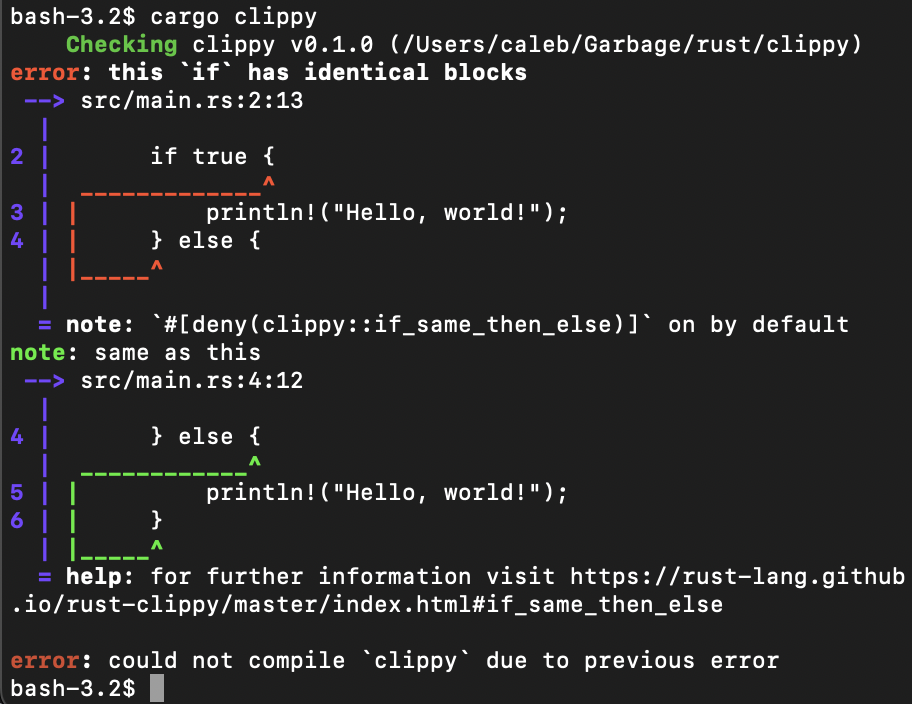
note says which rule you broke, and the help line gives you a web page about it. Read the whole thing — the answer is usually in it.
นี่คือหน้าตาของ error ใน Rust ของจริง ลูกศรชี้ไปที่ตัวอักษรที่เป็นปัญหาเป๊ะ ๆ บรรทัด note บอกว่าคุณผิดกฎข้อไหน และบรรทัด help ให้ลิงก์หน้าเว็บอธิบายเพิ่ม อ่านให้จบ เพราะคำตอบมักอยู่ในนั้น
这就是真实的 Rust 报错长什么样。箭头精确指向出问题的字符,note 说明你违反了哪条规则,help 那行还给你一个说明网页。整段读完 —— 答案通常就在里面。
Screenshot: Caleb Stanford — CC BY-SA 4.0, via Wikimedia Commons

6️⃣ Types are written down · ต้องเขียนชนิดข้อมูล · 类型要写出来
🇬🇧 English
Rust always knows the type of everything. Often it works it out for you, so you can write let age = 14; and it knows that is a number.
When you write the type yourself, it goes after a colon. These are the five you need first.
&str and String are both text, and beginners always ask why there are two. Short answer: &str is text you are only looking at; String is text you own and can change. Use String::from("...") when you need to keep it.
🇹🇭 ไทย
Rust รู้ชนิดของทุกอย่างเสมอ ส่วนใหญ่มันเดาให้เองได้ คุณจึงเขียน let age = 14; แล้วมันรู้ว่าเป็นตัวเลข
ถ้าจะเขียนชนิดเอง ให้ใส่หลังเครื่องหมายโคลอน ห้าชนิดนี้คือชุดแรกที่ต้องรู้
&str กับ String เป็นข้อความทั้งคู่ มือใหม่มักถามว่าทำไมต้องมีสองแบบ คำตอบสั้น ๆ คือ &str คือข้อความที่คุณแค่มองดู ส่วน String คือข้อความที่คุณเป็นเจ้าของและแก้ไขได้ ถ้าต้องเก็บไว้ใช้ ให้ใช้ String::from("...")
🇨🇳 中文
Rust 永远知道每样东西的类型。多数时候它自己就能推出来,所以你写 let age = 14; 它就知道那是数字。
要自己写类型的话,写在冒号后面。下面五个是最先要会的。
&str 和 String 都是文本,初学者总问为什么有两个。简单说:&str 是你只是看看的文本,String 是你拥有、可以改的文本。需要留着用就用 String::from("...")。
fn main() {
    let age: i32 = 14;
    let price: f64 = 45.5;
    let open: bool = true;
    let name: &str = "Ploy";
    let owned: String = String::from("Nong Mee");

    println!("{} {} {} {} {}", age, price, open, name, owned);
}
7️⃣ Functions · ฟังก์ชัน · 函数
🇬🇧 English
fn makes a function. The arrow -> says what comes back.
Look at add. The last line is a + b with no semicolon and no return. In Rust, the last thing in the block is what comes back. Add a semicolon and it returns nothing — a very common first mistake.
🇹🇭 ไทย
fn ใช้สร้างฟังก์ชัน ลูกศร -> บอกว่าคืนค่าอะไรกลับมา
ดูที่ add บรรทัดสุดท้ายคือ a + b ไม่มีเซมิโคลอน และไม่มี return ใน Rust สิ่งสุดท้ายในบล็อกคือค่าที่คืนกลับ ถ้าเติมเซมิโคลอนเข้าไป มันจะไม่คืนอะไรเลย เป็นความผิดพลาดแรกที่พบบ่อยมาก
🇨🇳 中文
fn 用来定义函数。箭头 -> 说明返回什么。
看 add:最后一行是 a + b,没有分号,也没有 return。在 Rust 里,代码块的最后一项就是返回值。加上分号它就什么都不返回了 —— 这是最常见的新手错误。
fn add(a: i32, b: i32) -> i32 {
    a + b
}

fn greet(name: &str) -> String {
    format!("Sawadee, {}!", name)
}

fn main() {
    println!("{}", add(2, 3));
    println!("{}", greet("Ploy"));
}
8️⃣ structs — your own kind of thing · struct — สร้างชนิดข้อมูลของคุณเอง · struct —— 自己定义的东西
🇬🇧 English
A struct groups facts into one thing, the way a Python class does. Then the dot reaches inside: creep.speed is the speed of this creep.
The functions go in a separate impl block. &self means this one creep — it is Python's self with a borrow sign in front.
If you did the space game in Python, this is the same Creep, written in Rust.
🇹🇭 ไทย
struct รวมข้อมูลหลายอย่างเป็นก้อนเดียว เหมือนคลาสใน Python จากนั้นใช้ จุด เอื้อมเข้าไปข้างใน creep.speed คือ ความเร็วของศัตรูตัวนี้
ส่วนฟังก์ชันไปอยู่ในบล็อก impl แยกต่างหาก &self แปลว่า ศัตรูตัวนี้ ก็คือ self ของ Python ที่มีเครื่องหมายยืมนำหน้า
ถ้าคุณเคยทำเกมอวกาศด้วย Python นี่คือ Creep ตัวเดียวกัน เขียนด้วย Rust
🇨🇳 中文
struct 把若干数据打包成一个东西,和 Python 的类一样。然后用点伸进去:creep.speed 就是这个敌人的速度。
函数写在单独的 impl 块里。&self 就是这一个敌人 —— 相当于 Python 的 self,前面多了个借用符号。
如果你做过 Python 版的太空游戏,这就是同一个 Creep,用 Rust 写出来。
struct Creep {
    name: String,
    speed: f64,
    hit_points: u32,
}

impl Creep {
    fn new(name: &str, speed: f64, hit_points: u32) -> Creep {
        Creep { name: name.to_string(), speed, hit_points }
    }

    fn is_alive(&self) -> bool {
        self.hit_points > 0
    }
}

fn main() {
    let mut a = Creep::new("fast one", 3.0, 1);
    let b = Creep::new("tough one", 1.0, 3);

    println!("{} moves at {}", a.name, a.speed);
    println!("{} has {} hit points", b.name, b.hit_points);

    a.hit_points -= 1;
    println!("{} alive? {}", a.name, a.is_alive());
}
9️⃣ Owning and borrowing · การเป็นเจ้าของและการยืม · 拥有与借用
🇬🇧 English
This is the idea that makes Rust different from every language you know. It takes one page.
Every value has exactly one owner. When you pass a String to a function, the function takes it, and you cannot use it again. Rust calls that a move.
Usually you do not want that. You want to lend it. Put & in front and the function only borrows it — you keep it.
This is why Rust needs no garbage collector, and why it can promise your program will not use memory that is already gone.
🇹🇭 ไทย
นี่คือแนวคิดที่ทำให้ Rust ต่างจากทุกภาษาที่คุณรู้จัก ใช้พื้นที่อธิบายแค่หน้าเดียว
ทุกค่ามีเจ้าของเพียงคนเดียว เมื่อคุณส่ง String เข้าไปในฟังก์ชัน ฟังก์ชันจะรับมันไป แล้วคุณใช้ต่อไม่ได้อีก Rust เรียกสิ่งนี้ว่า move
ส่วนใหญ่คุณไม่ได้อยากให้เป็นแบบนั้น คุณอยากให้ยืมมากกว่า ใส่ & ไว้ข้างหน้า ฟังก์ชันก็จะแค่ยืมไป และคุณยังเก็บมันไว้เหมือนเดิม
นี่คือเหตุผลที่ Rust ไม่ต้องมีตัวเก็บขยะ และเป็นเหตุผลที่มันรับประกันได้ว่าโปรแกรมของคุณจะไม่ไปใช้หน่วยความจำที่หายไปแล้ว
🇨🇳 中文
这是让 Rust 区别于你所知的每一门语言的概念。一页就能讲完。
每个值只有一个主人。当你把 String 传给一个函数,函数就把它拿走了,你不能再用。Rust 管这叫 move(移动)。
通常你并不想这样,你想借给它。在前面加个 &,函数就只是借用,东西还是你的。
这就是 Rust 不需要垃圾回收器的原因,也是它能保证你的程序不会去用已经消失的内存的原因。
fn shout(text: &String) -> String {
    text.to_uppercase()
}

fn main() {
    let name = String::from("Chiang Mai");

    // we lend it with &, so we can still use it afterwards
    println!("{}", shout(&name));
    println!("{} is still here", name);
}& away and it stops building. This error is the one every Rust beginner meets.
ถ้าเอา & ออก มันจะสร้างไม่ผ่าน error นี้คือสิ่งที่มือใหม่ Rust ทุกคนต้องเจอ
把 & 去掉它就编译不过。每个 Rust 新手都会碰上这个错误。
fn take(text: String) -> usize {
    text.len()
}

fn main() {
    let name = String::from("Chiang Mai");
    let n = take(name);
    println!("{} has {} letters", name, n);
}error[E0382]: borrow of moved value: `name`
--> src/main.rs:8:37
|
6 | let name = String::from("Chiang Mai");
| ---- move occurs because `name` has type `String`
7 | let n = take(name);
| ---- value moved here
8 | println!("{} has {} letters", name, n);
| ^^^^ value borrowed here after move
1️⃣0️⃣
When there might be nothing — Option
· เมื่ออาจไม่มีค่า — Option
· 可能什么都没有 —— Option
🇬🇧 English
Rust has no null, and no None hiding inside a normal value. If something might be missing, the type says so.
Option<u32> means: maybe a number, maybe nothing. It is always one of two things — Some(45) or None.
match looks at which one it is. You must write both arms. The compiler will not let you forget the empty case — and forgetting it is the most common crash in every other language.
🇹🇭 ไทย
Rust ไม่มี null และไม่มี None ซ่อนอยู่ในค่าปกติ ถ้าอะไรอาจหายไปได้ ชนิดข้อมูลจะบอกไว้เลย
Option<u32> แปลว่า อาจเป็นตัวเลข หรืออาจไม่มีอะไรเลย มันเป็นหนึ่งในสองอย่างเสมอ คือ Some(45) หรือ None
match ใช้ดูว่าเป็นอันไหน คุณต้องเขียนทั้งสองกรณี คอมไพเลอร์จะไม่ยอมให้คุณลืมกรณีที่ไม่มีค่า และการลืมกรณีนั้นคือสาเหตุที่โปรแกรมพังบ่อยที่สุดในทุกภาษาอื่น
🇨🇳 中文
Rust 没有 null,也不会有 None 藏在普通值里。如果某个东西可能没有,类型本身就会说出来。
Option<u32> 的意思是:可能是个数字,也可能什么都没有。它永远是两者之一 —— Some(45) 或 None。
match 用来看它是哪一个。两个分支都必须写。编译器不会让你漏掉"空"的情况 —— 而漏掉它正是其他所有语言里最常见的崩溃原因。
fn find_price(fruit: &str) -> Option<u32> {
    match fruit {
        "mango" => Some(45),
        "durian" => Some(200),
        _ => None,
    }
}

fn main() {
    match find_price("mango") {
        Some(price) => println!("mango costs {} baht", price),
        None => println!("we do not sell that"),
    }

    match find_price("apple") {
        Some(price) => println!("apple costs {} baht", price),
        None => println!("we do not sell that"),
    }
}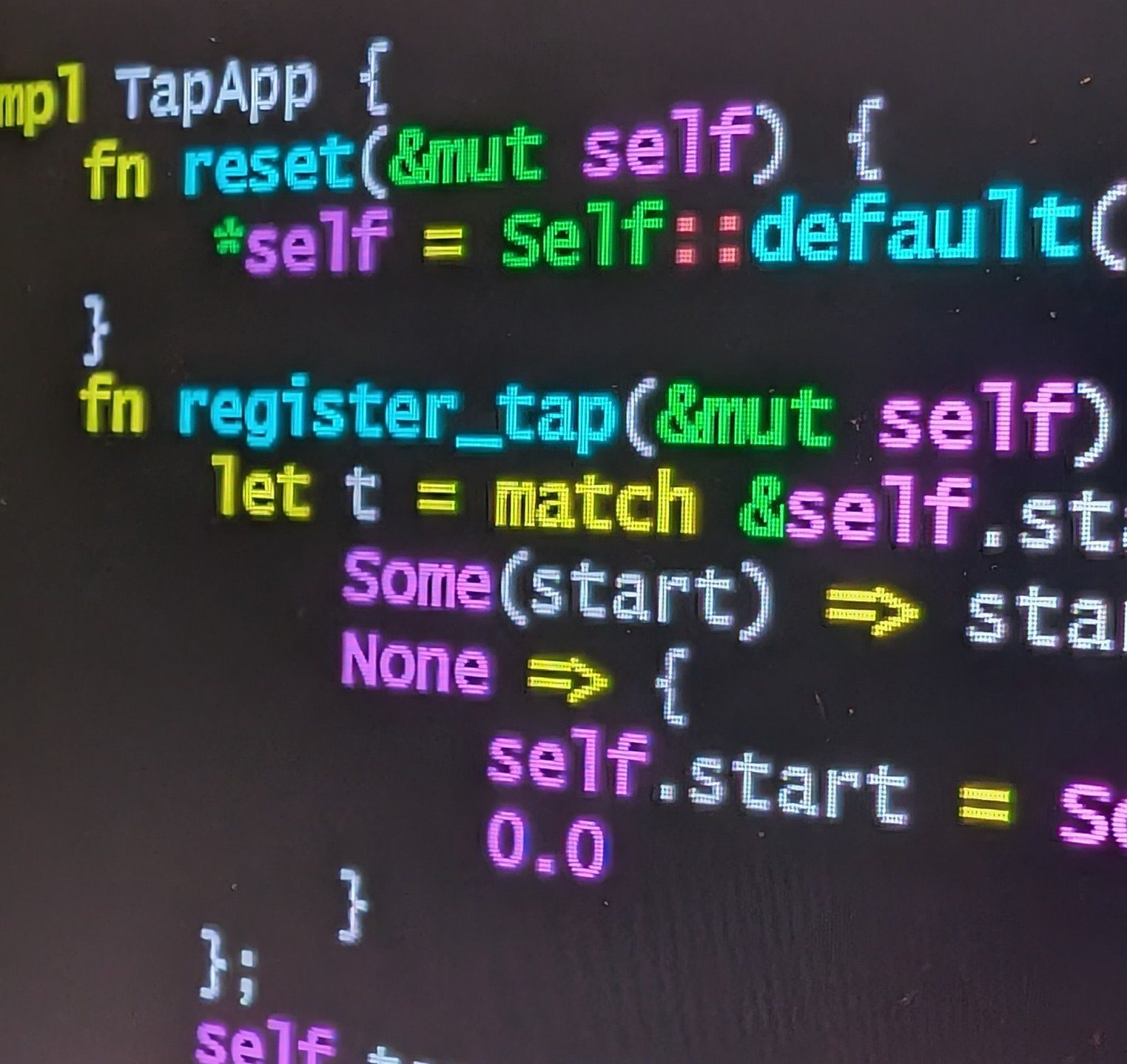
&mut self from the last section, and a match with a Some arm and a None arm — exactly what this section is about.
โค้ด Rust ของจริงบนจอของใครสักคน คุณอ่านได้เกือบหมดแล้ว ทั้ง &mut self จากหัวข้อที่แล้ว และ match ที่มีทั้งกิ่ง Some และกิ่ง None ตรงกับที่หัวข้อนี้กำลังพูดถึงพอดี
别人屏幕上真实的 Rust 代码。你已经能读懂大半了:上一节的 &mut self,还有一个带 Some 分支和 None 分支的 match —— 正是本节讲的东西。
Photo: Slashme — CC0, via Wikimedia Commons

1️⃣1️⃣
When something can fail — Result
· เมื่อบางอย่างอาจล้มเหลว — Result
· 可能会失败 —— Result
🇬🇧 English
Rust has no exceptions. Nothing is thrown. A function that can fail says so in its type, and hands you back a Result.
A Result is one of two things: Ok(value) if it worked, or Err(problem) if it did not.
You open it with match, exactly like Option. Both arms, every time.
This is the big idea: you cannot use the answer without first dealing with the failure. In Python you can ignore an exception and find out at three in the morning. In Rust the code does not build.
🇹🇭 ไทย
Rust ไม่มี exception ไม่มีการโยนข้อผิดพลาด ฟังก์ชันที่อาจล้มเหลวจะบอกไว้ในชนิดข้อมูล แล้วส่ง Result กลับมาให้
Result เป็นหนึ่งในสองอย่าง คือ Ok(value) ถ้าสำเร็จ หรือ Err(problem) ถ้าไม่สำเร็จ
เปิดดูด้วย match เหมือนกับ Option เป๊ะ ๆ ต้องเขียนทั้งสองกรณีทุกครั้ง
นี่คือแนวคิดสำคัญ คุณใช้คำตอบไม่ได้ ถ้ายังไม่จัดการกรณีล้มเหลวก่อน ใน Python คุณเมิน exception ได้ แล้วไปรู้ตัวตอนตีสาม แต่ใน Rust โค้ดจะสร้างไม่ผ่านตั้งแต่แรก
🇨🇳 中文
Rust 没有异常,不会抛出任何东西。可能失败的函数会在类型里说明,并交给你一个 Result。
Result 是两者之一:成功是 Ok(value),失败是 Err(problem)。
用 match 打开它,和 Option 一模一样。每次都要写两个分支。
这是最关键的一点:不先处理失败,你就拿不到结果。在 Python 里你可以无视一个异常,然后凌晨三点才发现。在 Rust 里,代码根本编译不过。
fn divide(a: f64, b: f64) -> Result<f64, String> {
    if b == 0.0 {
        return Err(String::from("cannot divide by zero"));
    }
    Ok(a / b)
}

fn main() {
    match divide(10.0, 2.0) {
        Ok(answer) => println!("the answer is {}", answer),
        Err(problem) => println!("problem: {}", problem),
    }

    match divide(10.0, 0.0) {
        Ok(answer) => println!("the answer is {}", answer),
        Err(problem) => println!("problem: {}", problem),
    }
}
1️⃣2️⃣
The ? shortcut — and the dangerous one
· ทางลัด ? และตัวที่อันตราย
· ? 这个捷径 —— 和那个危险的
🇬🇧 English
Writing match everywhere gets long. The ? mark is the short way.
Put ? after something that returns a Result. It means: if this worked, give me the value and carry on. If it failed, stop here and pass the error back to whoever called me.
Two lines instead of six, and the error is still handled — just handled higher up.
Now the dangerous one. unwrap() also opens a Result, but if it is an Err your program panics and stops dead.
🇹🇭 ไทย
ถ้าเขียน match ทุกที่ โค้ดจะยาวมาก เครื่องหมาย ? คือทางลัด
ใส่ ? ไว้หลังสิ่งที่คืนค่า Result มันแปลว่า ถ้าสำเร็จ ให้เอาค่ามาแล้วไปต่อ ถ้าล้มเหลว ให้หยุดตรงนี้แล้วส่ง error กลับไปให้คนที่เรียกฉัน
สองบรรทัดแทนหกบรรทัด และ error ก็ยังถูกจัดการอยู่ เพียงแต่ไปจัดการที่ชั้นบนแทน
ทีนี้ตัวที่อันตราย unwrap() ก็เปิด Result ได้เหมือนกัน แต่ถ้าเจอ Err โปรแกรมของคุณจะ panic แล้วหยุดทันที
🇨🇳 中文
到处写 match 会很啰嗦。问号 ? 就是那条捷径。
把 ? 放在返回 Result 的东西后面。它的意思是:成功就把值给我、继续往下走;失败就到此为止,把错误传回给调用我的人。
两行顶六行,而且错误依然被处理了 —— 只是挪到上一层去处理。
现在说危险的那个。unwrap() 也能打开 Result,但如果里面是 Err,你的程序就会 panic,当场停住。
fn to_number(text: &str) -> Result<i32, std::num::ParseIntError> {
    let number: i32 = text.parse()?;
    Ok(number * 2)
}

fn main() {
    match to_number("21") {
        Ok(n) => println!("double is {}", n),
        Err(e) => println!("bad number: {}", e),
    }

    match to_number("cat") {
        Ok(n) => println!("double is {}", n),
        Err(e) => println!("bad number: {}", e),
    }
}unwrap() says I am sure this worked. When you are wrong, the program dies. Fine for a quick test, wrong in anything real. expect("why") is a little better, because the message tells you what you assumed.
unwrap() แปลว่า ฉันมั่นใจว่าสำเร็จ ถ้าคุณคิดผิด โปรแกรมจะตาย ใช้ทดลองเร็ว ๆ ได้ แต่ห้ามใช้ในงานจริง expect("เหตุผล") ดีกว่านิดหนึ่ง เพราะข้อความจะบอกว่าคุณสมมติอะไรไว้
unwrap() 等于说我确定这成功了。你要是想错了,程序就死。快速试验可以,正经代码不行。expect("原因") 好一点,因为消息会说明你当时的假设。
fn main() {
    let text = "cat";
    let number: i32 = text.parse().unwrap();
    println!("{}", number);
}thread 'main' panicked at src/main.rs:3:36:
called `Result::unwrap()` on an `Err` value: ParseIntError { kind: InvalidDigit }
note: run with `RUST_BACKTRACE=1` environment variable to display a backtrace1️⃣3️⃣ The whole program · โปรแกรมทั้งหมด · 完整的程序
🇬🇧 English
Here is everything together in one small program. It reads five lines, keeps the good ones, and says exactly why it threw the others away.
Find each idea as you read: the struct, the Result, the ?, the Option for "no students at all", and match doing the work.
Notice that nothing crashes. Three of the five lines are broken, and the program handles all three and carries on. That is the whole point of this page.
🇹🇭 ไทย
นี่คือทุกอย่างรวมกันในโปรแกรมเล็ก ๆ ตัวเดียว มันอ่านห้าบรรทัด เก็บอันที่ใช้ได้ และบอกชัด ๆ ว่าทำไมถึงทิ้งอันที่เหลือ
ลองหาแต่ละแนวคิดระหว่างอ่าน ทั้ง struct, Result, ?, Option สำหรับกรณี "ไม่มีนักเรียนเลย" และ match ที่ทำงานหลัก
สังเกตว่าไม่มีอะไรพังเลย สามในห้าบรรทัดมีปัญหา และโปรแกรมจัดการได้ทั้งสามแล้วไปต่อ นั่นคือหัวใจของหน้านี้ทั้งหน้า
🇨🇳 中文
这里把所有东西合成一个小程序。它读五行,留下好的,并明确说出为什么丢掉其余的。
边读边找出每个概念:struct、Result、?、用于"一个学生都没有"的 Option,还有干活的 match。
注意:什么都没崩。五行里有三行是坏的,程序把三个都处理掉然后继续跑。这就是本页的全部重点。
// scores.rs - read some lines, keep the good ones, say why the rest failed.

#[derive(Debug)]
struct Student {
    name: String,
    score: u32,
}

fn parse_line(line: &str) -> Result<Student, String> {
    let parts: Vec<&str> = line.split(',').collect();

    if parts.len() != 2 {
        return Err(format!("a line needs a name and a score: \"{}\"", line));
    }

    let name = parts[0].trim().to_string();
    if name.is_empty() {
        return Err(String::from("the name is empty"));
    }

    let score: u32 = parts[1]
        .trim()
        .parse()
        .map_err(|_| format!("\"{}\" is not a number", parts[1].trim()))?;

    Ok(Student { name, score })
}

fn average(students: &Vec<Student>) -> Option<u32> {
    if students.is_empty() {
        return None;
    }
    let total: u32 = students.iter().map(|s| s.score).sum();
    Some(total / students.len() as u32)
}

fn main() {
    let lines = ["Ploy, 82", "Aroon, 91", "Nong Mee, ninety", "Somchai", ", 70"];

    let mut good: Vec<Student> = Vec::new();

    for line in lines {
        match parse_line(line) {
            Ok(student) => {
                println!("ok      {} scored {}", student.name, student.score);
                good.push(student);
            }
            Err(problem) => println!("skipped {}", problem),
        }
    }

    match average(&good) {
        Some(mean) => println!("\naverage of {} students = {}", good.len(), mean),
        None => println!("\nno good lines, so no average"),
    }
}ok Ploy scored 82
ok Aroon scored 91
skipped "ninety" is not a number
skipped a line needs a name and a score: "Somchai"
skipped the name is empty
average of 2 students = 861️⃣4️⃣ Where to go next · ไปต่อที่ไหน · 接下来去哪
🇬🇧 English
Do not install anything to try Rust again — the Rust Playground runs it in your browser. Paste any code from this page into it.
When you want the real book, The Rust Programming Language is free, official and very good. Chapter 9 is error handling, and it goes deeper than this page.
And Rust by Example if you learn better from running code than from reading.
One honest warning: Rust is harder than Python. Everybody fights the compiler for the first week. Then one day it stops fighting you, and it starts catching your mistakes before your users do.
🇹🇭 ไทย
ถ้าจะลอง Rust อีก ไม่ต้องติดตั้งอะไรเลย Rust Playground รันให้ในเบราว์เซอร์ วางโค้ดจากหน้านี้ลงไปได้เลย
เมื่ออยากอ่านหนังสือจริงจัง The Rust Programming Language เป็นหนังสือฟรี เป็นทางการ และดีมาก บทที่ 9 ว่าด้วยการจัดการข้อผิดพลาด และลงลึกกว่าหน้านี้
หรือ Rust by Example ถ้าคุณเรียนจากการรันโค้ดได้ดีกว่าการอ่าน
ขอเตือนตามตรงข้อหนึ่ง Rust ยากกว่า Python ทุกคนสู้กับคอมไพเลอร์ในสัปดาห์แรก แล้ววันหนึ่งมันจะเลิกสู้กับคุณ และเริ่มจับความผิดพลาดของคุณก่อนที่ผู้ใช้จะเจอ
🇨🇳 中文
想再试试 Rust 不用装任何东西 —— Rust Playground 直接在浏览器里跑。本页任何代码都可以粘进去。
想读正式的书,《The Rust Programming Language》免费、官方、而且非常好。第 9 章讲错误处理,比本页深入得多。
如果你更适合边跑代码边学,就看 Rust by Example。
一句老实话:Rust 比 Python 难。每个人第一周都在跟编译器打架。然后有一天它不再跟你打了,而是开始在用户之前替你抓住错误。
1️⃣5️⃣ Check yourself · ทดสอบตัวเอง · 自我检测
Resultnullnull. A function that can fail returns Result — Ok or Err.let count = 0; then count = 1;. What happens?mutlet mut. The compiler catches this before the program ever runs.Option mean?Option แปลว่าอะไร · Option 是什么意思?Some(x) or None. It is how Rust says "this might be empty" without having null.? do after a call that returns Result?? ทำอะไร · ? 有什么用?match: take the value and carry on, or stop and hand the error back up.unwrap() risky?unwrap() ถึงเสี่ยง · 为什么 unwrap() 危险?match or ? in real code.String to a function without &. What happens to your variable?String โดยไม่ใส่ & แล้วตัวแปรของคุณเป็นอย่างไร · 变量会怎样?& in front to lend it instead, and you keep it.